Image
GPT Image 2.5 Sunburst Text to Image Variants: 4
≈ $0.054
54 API credits
No matches. Try “video”, “FLUX” or “webhooks”.
Loading models…
openai/gpt-image-2.5/flare/text-to-image
# Run the model; wait up to 20 s for the finished result in the same call
curl -X POST "https://vit.doitong.com/api/v1/run/openai/gpt-image-2.5/flare/text-to-image?wait=20" \
  -H "Authorization: Bearer $DOITONG_API_KEY" \
  -H "Content-Type: application/json" \
  -d '{
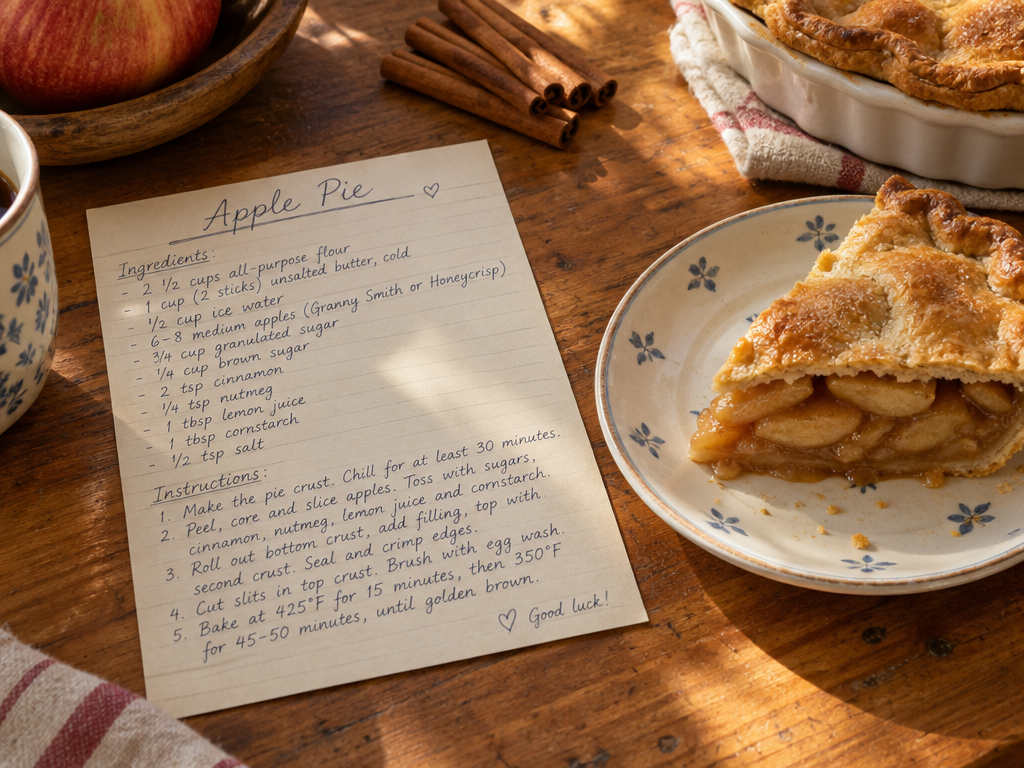
    "prompt": "A handwritten recipe card titled \"Apple Pie\" on a wooden kitchen table, neat cursive ingredient list, a slice of pie on a plate beside it, cinnamon sticks, warm afternoon light, photorealistic.",
    "quality": "medium"
  }'

# Still "queued" or "running"? Poll with the id from the response:
curl "https://vit.doitong.com/api/v1/requests/REQUEST_ID?wait=20" \
  -H "Authorization: Bearer $DOITONG_API_KEY"
const API = "https://vit.doitong.com/api/v1";
const headers = {
"Authorization": "Bearer " + process.env.DOITONG_API_KEY,
"Content-Type": "application/json",
};
// Run the model; wait up to 20 s for the finished result in the same call
let res = await fetch(API + "/run/openai/gpt-image-2.5/flare/text-to-image?wait=20", {
method: "POST",
headers,
body: JSON.stringify({
"prompt": "A handwritten recipe card titled \"Apple Pie\" on a wooden kitchen table, neat cursive ingredient list, a slice of pie on a plate beside it, cinnamon sticks, warm afternoon light, photorealistic.",
"quality": "medium"
}),
});
let request = await res.json();
if (!res.ok) throw new Error(request.error.code + ": " + request.error.message);
// Not finished yet: long-poll until it is
while (request.status === "queued" || request.status === "running") {
res = await fetch(API + "/requests/" + request.id + "?wait=20", { headers });
request = await res.json();
}
if (request.status !== "succeeded") throw new Error(JSON.stringify(request.error));
console.log(request.outputs.map((o) => o.url), request.cost.credits + " API credits ($" + request.cost.usd + ")");import os
import requests
API = "https://vit.doitong.com/api/v1"
headers = {"Authorization": "Bearer " + os.environ["DOITONG_API_KEY"]}
payload = {
"prompt": "A handwritten recipe card titled \"Apple Pie\" on a wooden kitchen table, neat cursive ingredient list, a slice of pie on a plate beside it, cinnamon sticks, warm afternoon light, photorealistic.",
"quality": "medium",
}
# Run the model; wait up to 20 s for the finished result in the same call
r = requests.post(API + "/run/openai/gpt-image-2.5/flare/text-to-image", params={"wait": 20}, json=payload, headers=headers)
request = r.json()
if not r.ok:
raise RuntimeError(request["error"]["code"] + ": " + request["error"]["message"])
# Not finished yet: long-poll until it is
while request["status"] in ("queued", "running"):
request = requests.get(API + "/requests/" + request["id"], params={"wait": 20}, headers=headers).json()
if request["status"] != "succeeded":
raise RuntimeError(request["error"])
print([o["url"] for o in request["outputs"]], request["cost"]["credits"], "API credits", "$" + request["cost"]["usd"])# 1. Connect once (Claude Code; Cursor, VS Code, Claude Desktop: https://doitong.com/developers/docs/mcp)
claude mcp add --transport http doitong-models https://vit.doitong.com/api/v1/mcp \
--header "Authorization: Bearer $DOITONG_API_KEY"
# 2. Your agent calls the "run" tool with:
{
"model_id": "openai/gpt-image-2.5/flare/text-to-image",
"input": {
"prompt": "A handwritten recipe card titled \"Apple Pie\" on a wooden kitchen table, neat cursive ingredient list, a slice of pie on a plate beside it, cinnamon sticks, warm afternoon light, photorealistic.",
"quality": "medium"
}
}Call the GPT Image 2.5 Text to Image model (openai/gpt-image-2.5/flare/text-to-image) through the Doitong API. Docs for agents: https://doitong.com/developers/models/openai/gpt-image-2.5/flare/text-to-image.md
POST https://vit.doitong.com/api/v1/run/openai/gpt-image-2.5/flare/text-to-image?wait=20
Authorization: Bearer $DOITONG_API_KEY
Content-Type: application/json
{
"prompt": "A handwritten recipe card titled \"Apple Pie\" on a wooden kitchen table, neat cursive ingredient list, a slice of pie on a plate beside it, cinnamon sticks, warm afternoon light, photorealistic.",
"quality": "medium"
}
If the response status is "queued" or "running", poll GET https://vit.doitong.com/api/v1/requests/REQUEST_ID?wait=20 until it is "succeeded"; the files are in outputs[].url. POST https://vit.doitong.com/api/v1/quote/openai/gpt-image-2.5/flare/text-to-image with the same body returns the exact price before the run.This request: $0.013 13 API credits Run it on this page
Your new API key. It is shown only now and is already in the code and in the API key field below. Keep it secret: never put it in code that runs in a browser.
Controls are generated from the model schema. The code and the price update as you change them.
/run/openai/gpt-image-2.5/flare/text-to-image?wait=20
quote → $0.013
# Run the model; wait up to 20 s for the finished result in the same call
curl -X POST "https://vit.doitong.com/api/v1/run/openai/gpt-image-2.5/flare/text-to-image?wait=20" \
  -H "Authorization: Bearer $DOITONG_API_KEY" \
  -H "Content-Type: application/json" \
  -d '{
    "prompt": "A handwritten recipe card titled \"Apple Pie\" on a wooden kitchen table, neat cursive ingredient list, a slice of pie on a plate beside it, cinnamon sticks, warm afternoon light, photorealistic.",
    "quality": "medium"
  }'

# Still "queued" or "running"? Poll with the id from the response:
curl "https://vit.doitong.com/api/v1/requests/REQUEST_ID?wait=20" \
  -H "Authorization: Bearer $DOITONG_API_KEY"
const API = "https://vit.doitong.com/api/v1";
const headers = {
"Authorization": "Bearer " + process.env.DOITONG_API_KEY,
"Content-Type": "application/json",
};
// Run the model; wait up to 20 s for the finished result in the same call
let res = await fetch(API + "/run/openai/gpt-image-2.5/flare/text-to-image?wait=20", {
method: "POST",
headers,
body: JSON.stringify({
"prompt": "A handwritten recipe card titled \"Apple Pie\" on a wooden kitchen table, neat cursive ingredient list, a slice of pie on a plate beside it, cinnamon sticks, warm afternoon light, photorealistic.",
"quality": "medium"
}),
});
let request = await res.json();
if (!res.ok) throw new Error(request.error.code + ": " + request.error.message);
// Not finished yet: long-poll until it is
while (request.status === "queued" || request.status === "running") {
res = await fetch(API + "/requests/" + request.id + "?wait=20", { headers });
request = await res.json();
}
if (request.status !== "succeeded") throw new Error(JSON.stringify(request.error));
console.log(request.outputs.map((o) => o.url), request.cost.credits + " API credits ($" + request.cost.usd + ")");import os
import requests
API = "https://vit.doitong.com/api/v1"
headers = {"Authorization": "Bearer " + os.environ["DOITONG_API_KEY"]}
payload = {
"prompt": "A handwritten recipe card titled \"Apple Pie\" on a wooden kitchen table, neat cursive ingredient list, a slice of pie on a plate beside it, cinnamon sticks, warm afternoon light, photorealistic.",
"quality": "medium",
}
# Run the model; wait up to 20 s for the finished result in the same call
r = requests.post(API + "/run/openai/gpt-image-2.5/flare/text-to-image", params={"wait": 20}, json=payload, headers=headers)
request = r.json()
if not r.ok:
raise RuntimeError(request["error"]["code"] + ": " + request["error"]["message"])
# Not finished yet: long-poll until it is
while request["status"] in ("queued", "running"):
request = requests.get(API + "/requests/" + request["id"], params={"wait": 20}, headers=headers).json()
if request["status"] != "succeeded":
raise RuntimeError(request["error"])
print([o["url"] for o in request["outputs"]], request["cost"]["credits"], "API credits", "$" + request["cost"]["usd"]){
"jsonrpc": "2.0",
"id": 1,
"method": "tools/call",
"params": {
"name": "run",
"arguments": {
"model_id": "openai/gpt-image-2.5/flare/text-to-image",
"input": {
"prompt": "A handwritten recipe card titled \"Apple Pie\" on a wooden kitchen table, neat cursive ingredient list, a slice of pie on a plate beside it, cinnamon sticks, warm afternoon light, photorealistic.",
"quality": "medium"
},
"wait_seconds": 20
}
}
}Your key stays in this browser: it is sent only to the Doitong API and saved (localStorage) only if you tick Remember. Get an API key
OpenAI's general-purpose image generator: it follows long, specific instructions, lays out text and diagrams cleanly and can return PNG or WebP with a transparent background for stickers, icons and product cut-outs. Five quality levels trade speed and price for detail. Sizes go up to 3840 px on the long edge (multiples of 16, at most 3:1); up to ten images per request.
Send either the canonical name or the native name, not both. Canonical names
promptrequired
image_sizeoptional
backgroundoptional
qualityoptional
num_imagesoptional
num_outputs
output_formatoptional
output_compressionoptional
{
  "id": "req_8k2m4q7x1z9c3v5b6n0p2r4t",
  "object": "request",
  "model": "openai/gpt-image-2.5/flare/text-to-image",
  "status": "succeeded",
  "created_at": "2026-10-20T12:00:00Z",
  "started_at": "2026-10-20T12:00:02Z",
  "completed_at": "2026-10-20T12:00:09Z",
  "queue_position": null,
  "cost": {
    "credits": 13,
    "usd": "0.013",
    "charged": 13,
    "refunded": 0
  },
  "input": {
    "prompt": "A flat vector sticker of a smiling cactus wearing sunglasses, thick white outline, no background",
    "image_size": "square_hd",
    "quality": "medium",
    "background": "transparent"
  },
  "output": {
    "images": [
      {
        "url": "https://content.doitong.com/dev-api/2026/10/20/req_8k2m4q7x1z9c3v5b6n0p2r4t/0-output.jpeg",
        "content_type": "image/jpeg",
        "file_name": "0-output.jpeg",
        "file_size": 1843200,
        "width": 1024,
        "height": 768
      }
    ]
  },
  "outputs": [
    {
      "type": "image",
      "url": "https://content.doitong.com/dev-api/2026/10/20/req_8k2m4q7x1z9c3v5b6n0p2r4t/0-output.jpeg",
      "content_type": "image/jpeg",
      "file_size": 1843200,
      "width": 1024,
      "height": 768,
      "stored": true
    }
  ],
  "error": null,
  "metrics": {
    "inference_seconds": 6.8
  },
  "urls": {
    "self": "https://vit.doitong.com/api/v1/requests/req_8k2m4q7x1z9c3v5b6n0p2r4t",
    "cancel": "https://vit.doitong.com/api/v1/requests/req_8k2m4q7x1z9c3v5b6n0p2r4t/cancel"
  }
}





For AI agents: this page as Markdown is at https://doitong.com/developers/models/openai/gpt-image-2.5/flare/text-to-image.md. All models and guides: https://doitong.com/developers/llms.txt