Bild
GPT Image 2.5 Sunburst Text to Image Varianten: 4
≈ 0,054 $
54 API-Credits
Keine Treffer. Versuche „video“, „FLUX“ oder „webhooks“.
Modelle werden geladen…
openai/gpt-image-2.5/flare/text-to-image
# Run the model; wait up to 20 s for the finished result in the same call
curl -X POST "https://vit.doitong.com/api/v1/run/openai/gpt-image-2.5/flare/text-to-image?wait=20" \
  -H "Authorization: Bearer $DOITONG_API_KEY" \
  -H "Content-Type: application/json" \
  -d '{
    "prompt": "A handwritten recipe card titled \"Apple Pie\" on a wooden kitchen table, neat cursive ingredient list, a slice of pie on a plate beside it, cinnamon sticks, warm afternoon light, photorealistic.",
    "quality": "medium"
  }'

# Still "queued" or "running"? Poll with the id from the response:
curl "https://vit.doitong.com/api/v1/requests/REQUEST_ID?wait=20" \
  -H "Authorization: Bearer $DOITONG_API_KEY"
const API = "https://vit.doitong.com/api/v1";
const headers = {
"Authorization": "Bearer " + process.env.DOITONG_API_KEY,
"Content-Type": "application/json",
};
// Run the model; wait up to 20 s for the finished result in the same call
let res = await fetch(API + "/run/openai/gpt-image-2.5/flare/text-to-image?wait=20", {
method: "POST",
headers,
body: JSON.stringify({
"prompt": "A handwritten recipe card titled \"Apple Pie\" on a wooden kitchen table, neat cursive ingredient list, a slice of pie on a plate beside it, cinnamon sticks, warm afternoon light, photorealistic.",
"quality": "medium"
}),
});
let request = await res.json();
if (!res.ok) throw new Error(request.error.code + ": " + request.error.message);
// Not finished yet: long-poll until it is
while (request.status === "queued" || request.status === "running") {
res = await fetch(API + "/requests/" + request.id + "?wait=20", { headers });
request = await res.json();
}
if (request.status !== "succeeded") throw new Error(JSON.stringify(request.error));
console.log(request.outputs.map((o) => o.url), request.cost.credits + " API credits ($" + request.cost.usd + ")");import os
import requests
API = "https://vit.doitong.com/api/v1"
headers = {"Authorization": "Bearer " + os.environ["DOITONG_API_KEY"]}
payload = {
"prompt": "A handwritten recipe card titled \"Apple Pie\" on a wooden kitchen table, neat cursive ingredient list, a slice of pie on a plate beside it, cinnamon sticks, warm afternoon light, photorealistic.",
"quality": "medium",
}
# Run the model; wait up to 20 s for the finished result in the same call
r = requests.post(API + "/run/openai/gpt-image-2.5/flare/text-to-image", params={"wait": 20}, json=payload, headers=headers)
request = r.json()
if not r.ok:
raise RuntimeError(request["error"]["code"] + ": " + request["error"]["message"])
# Not finished yet: long-poll until it is
while request["status"] in ("queued", "running"):
request = requests.get(API + "/requests/" + request["id"], params={"wait": 20}, headers=headers).json()
if request["status"] != "succeeded":
raise RuntimeError(request["error"])
print([o["url"] for o in request["outputs"]], request["cost"]["credits"], "API credits", "$" + request["cost"]["usd"])# 1. Connect once (Claude Code; Cursor, VS Code, Claude Desktop: https://doitong.com/de/developers/docs/mcp)
claude mcp add --transport http doitong-models https://vit.doitong.com/api/v1/mcp \
--header "Authorization: Bearer $DOITONG_API_KEY"
# 2. Your agent calls the "run" tool with:
{
"model_id": "openai/gpt-image-2.5/flare/text-to-image",
"input": {
"prompt": "A handwritten recipe card titled \"Apple Pie\" on a wooden kitchen table, neat cursive ingredient list, a slice of pie on a plate beside it, cinnamon sticks, warm afternoon light, photorealistic.",
"quality": "medium"
}
}Rufe das Modell GPT Image 2.5 Text to Image (openai/gpt-image-2.5/flare/text-to-image) über die Doitong API auf. Dokumentation für Agenten: https://doitong.com/de/developers/models/openai/gpt-image-2.5/flare/text-to-image.md
POST https://vit.doitong.com/api/v1/run/openai/gpt-image-2.5/flare/text-to-image?wait=20
Authorization: Bearer $DOITONG_API_KEY
Content-Type: application/json
{
"prompt": "A handwritten recipe card titled \"Apple Pie\" on a wooden kitchen table, neat cursive ingredient list, a slice of pie on a plate beside it, cinnamon sticks, warm afternoon light, photorealistic.",
"quality": "medium"
}
Wenn der Antwortstatus "queued" oder "running" lautet, frage GET https://vit.doitong.com/api/v1/requests/REQUEST_ID?wait=20 ab, bis er "succeeded" lautet; die Dateien befinden sich in outputs[].url. POST https://vit.doitong.com/api/v1/quote/openai/gpt-image-2.5/flare/text-to-image mit demselben Body gibt den exakten Preis vor der Ausführung zurück.Diese Anfrage: 0,013 $ 13 API-Credits Auf dieser Seite ausführen
Dein neuer API-Schlüssel. Sie wird nur jetzt angezeigt und befindet sich bereits im Code und im untenstehenden API-Schlüssel-Feld. Halten Sie sie geheim: Fügen Sie sie niemals in Code ein, der in einem Browser ausgeführt wird.
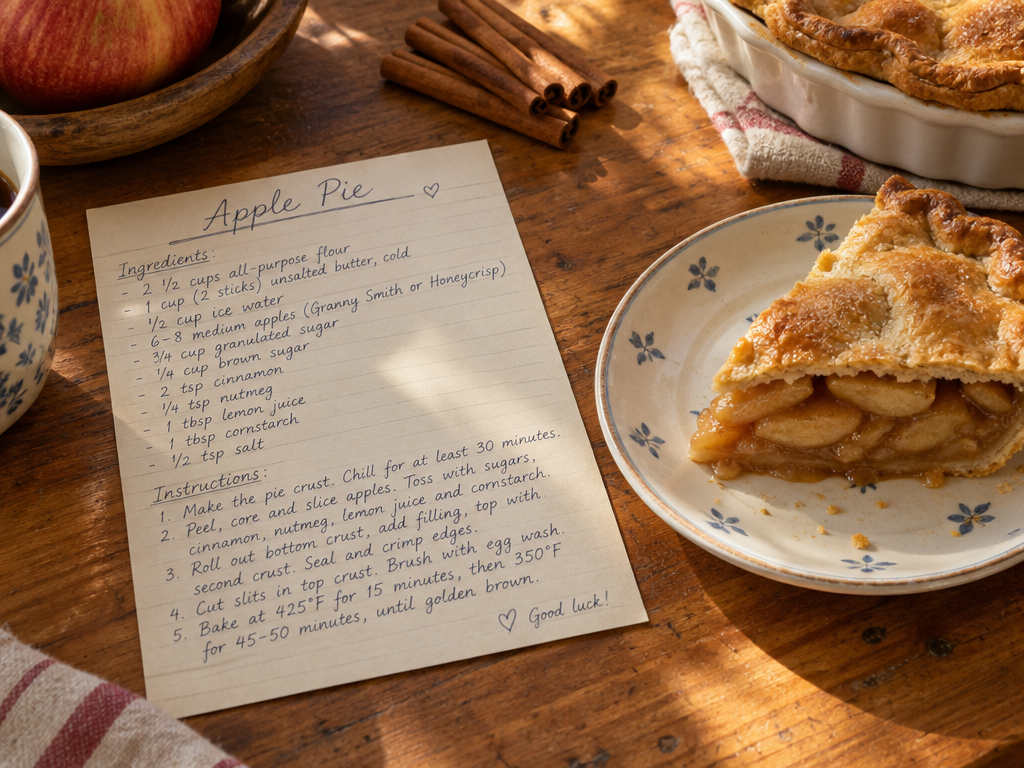
Die Steuerelemente werden aus dem Modellschema generiert. Code und Preis werden aktualisiert, während du sie änderst.
/run/openai/gpt-image-2.5/flare/text-to-image?wait=20
Preis → 0,013 $
# Run the model; wait up to 20 s for the finished result in the same call
curl -X POST "https://vit.doitong.com/api/v1/run/openai/gpt-image-2.5/flare/text-to-image?wait=20" \
  -H "Authorization: Bearer $DOITONG_API_KEY" \
  -H "Content-Type: application/json" \
  -d '{
    "prompt": "A handwritten recipe card titled \"Apple Pie\" on a wooden kitchen table, neat cursive ingredient list, a slice of pie on a plate beside it, cinnamon sticks, warm afternoon light, photorealistic.",
    "quality": "medium"
  }'

# Still "queued" or "running"? Poll with the id from the response:
curl "https://vit.doitong.com/api/v1/requests/REQUEST_ID?wait=20" \
  -H "Authorization: Bearer $DOITONG_API_KEY"
const API = "https://vit.doitong.com/api/v1";
const headers = {
"Authorization": "Bearer " + process.env.DOITONG_API_KEY,
"Content-Type": "application/json",
};
// Run the model; wait up to 20 s for the finished result in the same call
let res = await fetch(API + "/run/openai/gpt-image-2.5/flare/text-to-image?wait=20", {
method: "POST",
headers,
body: JSON.stringify({
"prompt": "A handwritten recipe card titled \"Apple Pie\" on a wooden kitchen table, neat cursive ingredient list, a slice of pie on a plate beside it, cinnamon sticks, warm afternoon light, photorealistic.",
"quality": "medium"
}),
});
let request = await res.json();
if (!res.ok) throw new Error(request.error.code + ": " + request.error.message);
// Not finished yet: long-poll until it is
while (request.status === "queued" || request.status === "running") {
res = await fetch(API + "/requests/" + request.id + "?wait=20", { headers });
request = await res.json();
}
if (request.status !== "succeeded") throw new Error(JSON.stringify(request.error));
console.log(request.outputs.map((o) => o.url), request.cost.credits + " API credits ($" + request.cost.usd + ")");import os
import requests
API = "https://vit.doitong.com/api/v1"
headers = {"Authorization": "Bearer " + os.environ["DOITONG_API_KEY"]}
payload = {
"prompt": "A handwritten recipe card titled \"Apple Pie\" on a wooden kitchen table, neat cursive ingredient list, a slice of pie on a plate beside it, cinnamon sticks, warm afternoon light, photorealistic.",
"quality": "medium",
}
# Run the model; wait up to 20 s for the finished result in the same call
r = requests.post(API + "/run/openai/gpt-image-2.5/flare/text-to-image", params={"wait": 20}, json=payload, headers=headers)
request = r.json()
if not r.ok:
raise RuntimeError(request["error"]["code"] + ": " + request["error"]["message"])
# Not finished yet: long-poll until it is
while request["status"] in ("queued", "running"):
request = requests.get(API + "/requests/" + request["id"], params={"wait": 20}, headers=headers).json()
if request["status"] != "succeeded":
raise RuntimeError(request["error"])
print([o["url"] for o in request["outputs"]], request["cost"]["credits"], "API credits", "$" + request["cost"]["usd"]){
"jsonrpc": "2.0",
"id": 1,
"method": "tools/call",
"params": {
"name": "run",
"arguments": {
"model_id": "openai/gpt-image-2.5/flare/text-to-image",
"input": {
"prompt": "A handwritten recipe card titled \"Apple Pie\" on a wooden kitchen table, neat cursive ingredient list, a slice of pie on a plate beside it, cinnamon sticks, warm afternoon light, photorealistic.",
"quality": "medium"
},
"wait_seconds": 20
}
}
}Dein Schlüssel bleibt in diesem Browser: Er wird nur an die Doitong API gesendet und nur gespeichert (localStorage), wenn du „Merken“ aktivierst. API-Schlüssel abrufen
Universeller Bildgenerator von OpenAI: Befolgt lange, spezifische Anweisungen, platziert Text und Diagramme sauber und kann PNG oder WebP mit transparentem Hintergrund für Sticker, Symbole und Produktfreisteller ausgeben. Fünf Qualitätsstufen bieten unterschiedliche Geschwindigkeit, Preise und Detailgrad. Größen gehen bis zu 3840 px an der langen Kante (Vielfache von 16, höchstens 3:1); bis zu zehn Bilder pro Anfrage.
Sende entweder den kanonischen Namen oder den nativen Namen, nicht beide. Kanonische Namen
prompterforderlich
image_sizeoptional
backgroundoptional
qualityoptional
num_imagesoptional
num_outputs
output_formatoptional
output_compressionoptional
{
  "id": "req_8k2m4q7x1z9c3v5b6n0p2r4t",
  "object": "request",
  "model": "openai/gpt-image-2.5/flare/text-to-image",
  "status": "succeeded",
  "created_at": "2026-10-20T12:00:00Z",
  "started_at": "2026-10-20T12:00:02Z",
  "completed_at": "2026-10-20T12:00:09Z",
  "queue_position": null,
  "cost": {
    "credits": 13,
    "usd": "0.013",
    "charged": 13,
    "refunded": 0
  },
  "input": {
    "prompt": "A flat vector sticker of a smiling cactus wearing sunglasses, thick white outline, no background",
    "image_size": "square_hd",
    "quality": "medium",
    "background": "transparent"
  },
  "output": {
    "images": [
      {
        "url": "https://content.doitong.com/dev-api/2026/10/20/req_8k2m4q7x1z9c3v5b6n0p2r4t/0-output.jpeg",
        "content_type": "image/jpeg",
        "file_name": "0-output.jpeg",
        "file_size": 1843200,
        "width": 1024,
        "height": 768
      }
    ]
  },
  "outputs": [
    {
      "type": "image",
      "url": "https://content.doitong.com/dev-api/2026/10/20/req_8k2m4q7x1z9c3v5b6n0p2r4t/0-output.jpeg",
      "content_type": "image/jpeg",
      "file_size": 1843200,
      "width": 1024,
      "height": 768,
      "stored": true
    }
  ],
  "error": null,
  "metrics": {
    "inference_seconds": 6.8
  },
  "urls": {
    "self": "https://vit.doitong.com/api/v1/requests/req_8k2m4q7x1z9c3v5b6n0p2r4t",
    "cancel": "https://vit.doitong.com/api/v1/requests/req_8k2m4q7x1z9c3v5b6n0p2r4t/cancel"
  }
}





Für KI-Agenten: Diese Seite ist als Markdown verfügbar unter https://doitong.com/de/developers/models/openai/gpt-image-2.5/flare/text-to-image.md. Alle Modelle und Anleitungen: https://doitong.com/developers/llms.txt